
 Can I pre-load Company of Heroes 3?
Yes! Pre-loading begins a day before via Steam on February 22nd at 10:00AM PT / 1:00PM EST / 6PM GMT.
What platforms will Company of Heroes 3 be available on?
Company of Heroes 3 will be available on PC via Steam on February 23rd, 2023. CoH3 will also be coming to Xbox Series X & Xbox Series S and PlayStation 5 later this year. You can find our full Console FAQ here.
Will Company of Heroes 3 be coming to any on-demand or streaming platforms?
We have no plans to bring CoH3 to on-demand or streaming services anytime soon. You can wish list it on the Xbox store, Playstation store, or buy it on Steam.
What do I get when I buy Company of Heroes 3?
CoH3 will be the biggest game at launch in the franchise’s history. You can find a full breakdown of the game’s contents at launch, plus some of our early post-launch plans here.
What do I get in the different physical or digital editions of Company of Heroes 3?
 Physical Premium Edition:
Company of Heroes 3
Expansion Pack #1 [Coming 2023]
Pioneer Title & Profile Border
Devil’s Brigade DLC Pack
- US Riflemen Cosmetic
- US M18 Hellcat Cosmetic
- US Scout Cosmetic
- US M8 Hellcat Cosmetic
- US Sniper Cosmetic
- Premium US HQ Cosmetic
- Premium Victory Point Cosmetic
- Premium US M4 Sherman Cosmetic
- Limited Edition Packaging
- Devil’s Brigade Embroidered Patch
- Double Sided Map
- Collector’s Book
- Metal Case
- Premium Service Medal
- Premium Pocket Compass
- Premium Big Box
 Physical Launch Edition:
Company of Heroes 3
Pioneer Title & Profile Border
Devil’s Brigade DLC Pack
- US Riflemen Cosmetic
- US M18 Hellcat Cosmetic
- US Scout Cosmetic
- US M8 Hellcat Cosmetic
- US Sniper Cosmetic
- Premium US HQ Cosmetic
- Premium Victory Point Cosmetic
- Premium US M4 Sherman Cosmetic
- Limited Edition Packaging
- Devil’s Brigade Embroidered Patch
- Double Sided Map
- Collector’s Book
 Digital Premium Edition:
Company of Heroes 3
Expansion Pack #1 [Coming 2023]
Pioneer Title & Profile Border
Devil’s Brigade DLC Pack
- US Riflemen Cosmetic
- US M18 Hellcat Cosmetic
- US Scout Cosmetic
- US M8 Hellcat Cosmetic
- US Sniper Cosmetic
- Premium US HQ Cosmetic
- Premium Victory Point Cosmetic
- Premium US M4 Sherman Cosmetic
 Digital Launch Edition:
Company of Heroes 3
Pioneer Title & Profile Border
Devil’s Brigade DLC Pack
- US Riflemen Cosmetic
- US M18 Hellcat Cosmetic
- US Scout Cosmetic
- US M8 Hellcat Cosmetic
- US Sniper Cosmetic
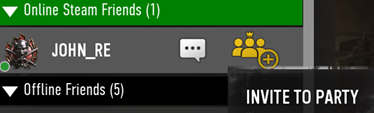
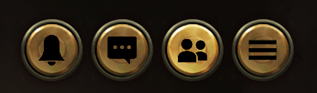 From there, you can search from your online friends. You can either start an in-game chat or invite them to form a party.
 Where can I meet others to play with?
Our official Discord server has a dedicated ‘Looking For Group’ channel, along with auto-generated voice channels for you and your squad!
Where should I leave my feedback?
You can leave your feedback on our official forums here. We plan to spend a bit more time gathering your feedback before we discuss future updates, patches, and fixes. Our goal is to allow you the time to explore and experiment with CoH3 so we can identify the top areas of feedback. We plan to follow-up in a few weeks to address as much as we can! Any emergencies or critical issues we will address as soon as possible.
Where can I find the Known Issues list for Company of Heroes 3?
Here's our Known Issues list for the 1.00 launch version of CoH3. We will continue to update this list in the coming days.
How do I report a bug I found in Company of Heroes 3?
We greatly appreciate all your help finding and reporting bugs so that we can continue improving CoH3. You can leave a bug report by filling out this form here. Be sure to select Company of Heroes 3 under Game or Service and Report Feedback or Bug under Nature of Enquiry.
I’m having trouble redeeming Company of Heroes 3 on Steam.
Please reach out to Steam’s Support team here.
I’m having a technical issue with Company of Heroes 3. What should I do?
You can find our Knowledge Center here, which outlines the answers to many technical, account and support related issues. You can also contact our Customer Support team directly here.
I’m having an issue with one of the items in the pre-order DLC packs. What should I do?
Please contact our Customer Support team here.
How do I report or block another player in-game?
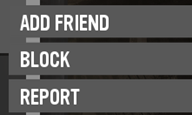
Right click a player’s name from any in-game menu. From there you can select Block to avoid future interactions with that player. To report them, click Report and fill out the form with all the relevant details.
 Why are certain graphics settings unavailable in my settings menu?
To access 4K resolution and the highest texture settings, please ensure that you are using a GPU with 16GB of memory or more.
Where can I see my statistics?
You can find our Leaderboards here. Data will slowly begin to populate in the leaderboards after launch.
How can I take cool screenshots?
By default, you can use the shortcut CTRL + SHIFT + / to toggle Screenshot Mode and hide the game’s user interface. In any singleplayer game, Tactical Pause (pressing spacebar) is your friend! Along with this, in any mode you can hold the ALT key and move your mouse to change the camera angle. Use your mouse’s scroll wheel to control the zoom. Share your best screenshots with us using the hashtag #CoHCommunity and you could be featured in our next Wire Report!
How can I watch a replay file in-game?
Though we are still working on the 1.0 version of our Replay feature, we understand not having this at CoH3’s launch makes creating content, hosting tournaments, coaching, etc. more cumbersome. For now, you can make use of a workaround to force the game to play a replay file. Note: this method is not fully stable and could result in playback desynchronization, crashes, or other issues. This workaround will not allow you to see the perspective of both teams.
- When you complete a multiplayer, coop, or custom game, navigate to the playback folder on your computer. It should be in a file path like this: MYNAME\Documents\My Games\Company of Heroes 3\playback
- Your most recent match will be saved as temp.rec
- Rename this file, otherwise it will be automatically overwritten when you play your next match
- Right-click Company of Heroes 3 in your Steam library and select Properties
- Under Launch Options, input the following argument string, and be sure to change “filename” to whatever you saved your replay file as:
- -replay playback:filename.rec

- Now, click Play on the game. It should now load directly into your replay file
- Tactical Pause will work during replays